StarTech.com 4 k Video Converter USB 3.0 Portswith HDMI - 4 xUSB ports
- RS-artikelnummer:
- 213-3169
- Distrelec artikelnummer:
- 302-31-391
- Tillv. art.nr:
- MOD4DOCKACPD
- Tillverkare / varumärke:
- StarTech.com

Antal (1 enhet)*
6 951,25 kr
(exkl. moms)
8 689,06 kr
(inkl. moms)
GRATIS leverans för online beställningar över 500,00 kr
Tillfälligt slut
- Leverans från den 06 mars 2026
Behöver du mer? Ange den kvantitet du behöver och klicka på "Kontrollera leveransdatum"
Enheter | Per enhet |
|---|---|
| 1 + | 6 951,25 kr |
*vägledande pris
- RS-artikelnummer:
- 213-3169
- Distrelec artikelnummer:
- 302-31-391
- Tillv. art.nr:
- MOD4DOCKACPD
- Tillverkare / varumärke:
- StarTech.com
Specifikationer
Datablad
Lagstiftning och ursprungsland
Produktdetaljer
Hitta liknande produkter genom att välja ett eller flera attribut.
Välj alla | Attribut | Värde |
|---|---|---|
| Brand | StarTech.com | |
| Product Type | Video Converter | |
| USB Specification | USB 3.0 | |
| Supported Number of Displays | 1 | |
| Number of USB Ports | 4 | |
| Maximum Resolution | 4 k | |
| Video Connection Type | HDMI | |
| Välj alla | ||
|---|---|---|
Brand StarTech.com | ||
Product Type Video Converter | ||
USB Specification USB 3.0 | ||
Supported Number of Displays 1 | ||
Number of USB Ports 4 | ||
Maximum Resolution 4 k | ||
Video Connection Type HDMI | ||
RoHS-status: Undantagen
- COO (Country of Origin):
- TW
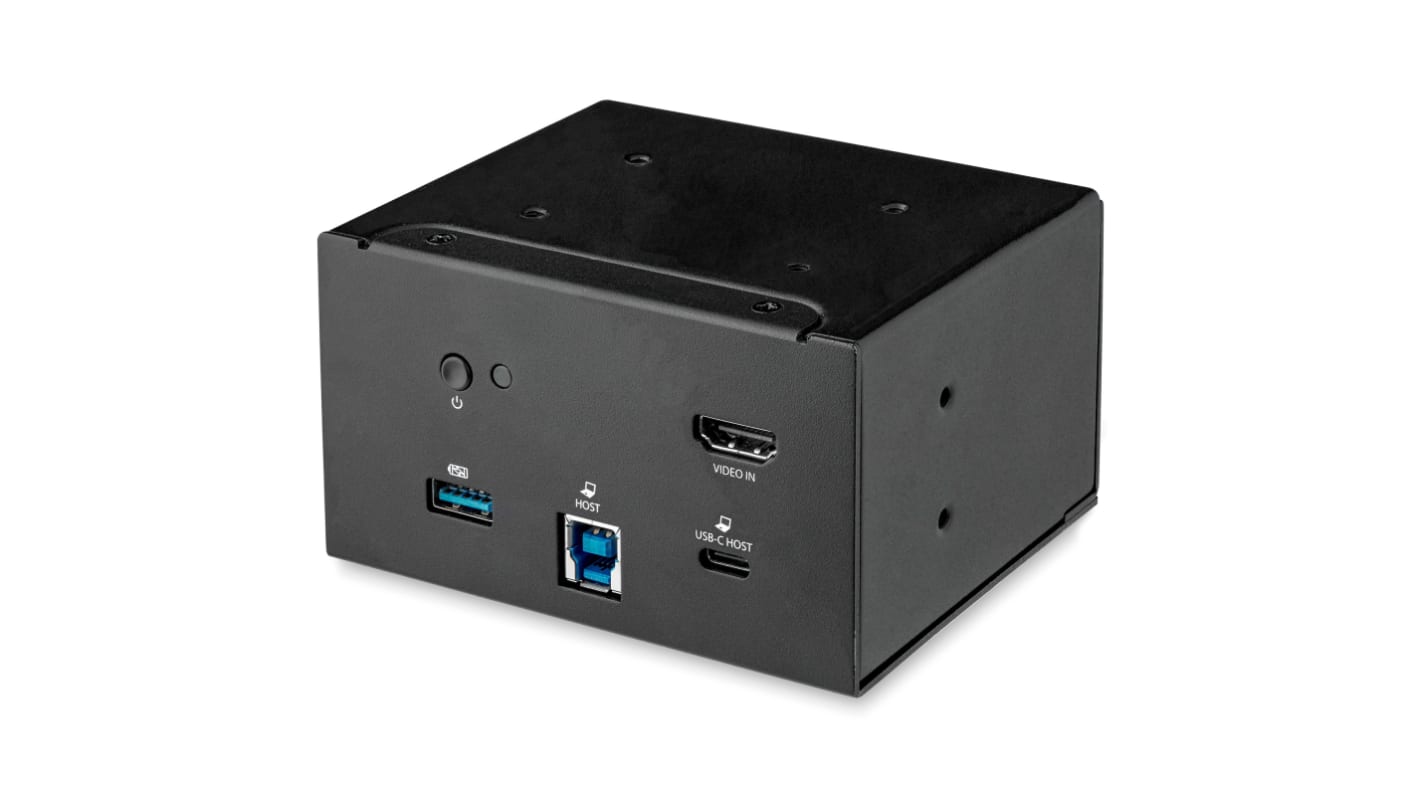
StarTech.com Docking Module, 6 USB Ports, 5Gbps - MOD4DOCKACPD
Use this docking module from StarTech.com to access display and collaboration peripherals from your laptop. It uses a single connection to let your HDMI (high-definition multimedia interface), speaker and network devices interact at the same time. Thanks to its aluminium and plastic housing materials, it's durable and resistant to impact and corrosion, so offers reliable performance in harsh environments. You'll find it used in applications such as video conferencing and gaming.
Wide compatibility rangeCompatible with most operating systems, including Windows, macOS and ChromeOS, making it a versatile choice.
Reliable power deliveryThanks to its USB Power Delivery 2.0 feature, you can use this device to charge to provide up to 60W to your C-type laptops and mobile devices.
Features & Benefits
• Data transfer rate of 5Gbps (gigabits per second) for high-speed communication on USB 3.0 ports
• Supports 4K resolution for crisp graphics display
• Docking Station Module for Conference Table Connectivity Box
FAQs
How do I install this docking station?This unit is simple to install, thanks to its plug-and-play technology. Simply connect it to a power source and it's ready to use. You can either mount it as a standalone device or as an addition to a table connectivity box.
Relaterade länkar
- StarTech.com Triple Monitor 4K USB 3.0 Docking Station with DisplayPort USB A, USB B
- StarTech.com 4K USB-C Docking Station with HDMI - 2 x USB ports
- StarTech.com 4K USB-C Docking Station with HDMI - 2 x USB ports, USB C
- StarTech.com 4K USB-C Docking Station with HDMI - 1 x USB ports, USB C
- StarTech.com 4K USB-C Docking Station with HDMI - 3 x USB ports, USB C
- StarTech.com 4K Docking Station with HDMI USB A, USB C
- StarTech.com 4K USB-C Docking Station with HDMI - 1 x USB ports USB C
- StarTech.com 4K USB-C Docking Station with HDMI - 3 x USB ports USB C